Friday, September 13, 2013

IM - Texting Abbreviations, 2013

Hello Friends..!!

Texting Abbreviations, 2013

For Instant Messaging

1. coo Smile


COO – Cool

2. gerd


gerd / ermahgerd - god / oh my god!

3. hmu Punch


HMU - Hit Me Up

4. wut Disappointed smile


wut - what

ALSO: wuteva - whatever

5. props Hot smile


PROPS - Proper Respect and Acknowledgement

6. sup


SUP - What's Up

7. idk Confused smile


IDK - I Don't Know

8. wbu


WBU - What About You?

9. kk Thumbs up


Photodisc / Getty Images

KK - OK

10. idc Devil


IDC - I Don't Care

11. wdymbt


WDYMBT - What Do You Mean By That?

12. jk Winking smile


JK - Just Kidding

Also: JJ - Just Joking

13. meh


Meh - "I feel mediocre about that"

14. uok


UOK - Are You OK?

15. tbh


TBH - To Be Honest

16. wtf


WTF - What the F*ck?

17. gtg


GTG - We're Good to Go

Also: GTG - I've Got to Go

18. fml Sad smile


FML - F*ck My Life

19. gg (gj) Thumbs up


GG = Good Game

GJ = Good Job

20. wtb (wtt)


WTB - Want to Buy

Also: WTT - Want to Trade

21. bbiab


BBIAB - Be Back in a Bit (see also: BRB - Be Right Back)

22. bisly


BISLY - But I Still Love You

23. omg (amg)


OMG - Oh My God!

Also: AMG - Ah, My God!

24. jtlyk


JTLYK - Just to Let You Know

25. ftw


FTW - For the Win

26. lol (lolz, lawlz)

 Rolling on the floor laughing Nyah-Nyah Party smile

LOL - Laughing Out Loud

Also: LOLZ - Laughing Out Loud

Also: LAWLZ - Laughing Out Loud (in leetspeak spelling)

27. nvm


NVM - Never Mind
Also: NM - Never Mind

28. w/e (wuteva)


W/E - Whatever

Also: wuteva - Whatever

29. cya High five


CYA - See Ya 

Also: C U  - See You

Also: CUL8R  - See You Later

30. bff


BFF - Best Friends, Forever

31. brb


BRB - Be Right Back

32. btw


BTW - By the Way

33. fwiw


FWIW - For What It's Worth

34. btaim


BTAM - Be That as It May

35. ntim


NTIM - Not That It Matters

36. wb


WB - Welcome Back

37. np


NP - No Problem

38. dh and dw


DH - Darling Husband

DW - Darling Wife

39. bio


BIO - Bio Break


40. wtg


WTG - Way to Go!

Also: GJ - Good Job

Also: GG - Good Game

Also: Props - Proper Respect and Recognition


41. asl


ASL = Question: Your Age / Sex / Location?


42. O RLY


O RLY - Oh, Really?


43. iirc


IIRC - If I Recall Correctly


44. imho (imo)


IMHO - In My Humble Opinion

Also: JMHO - Just My Humble Opinion

Also: IMO - In My Opinion

45. irl


IRL - In Real Life

Also: RL - Real Life


46. mego


My Eyes Glaze Over


47. mtfbwy


MTFBWY - May the Force Be With You


48. noob Thumbs down


Noob - Newcomer / Rookie / Amateur

Also: Nub

Also: Newb

Also: Noobie

49. oatus


OATUS - On a Totally Unrelated Subject

50. o gawd


O GAWD - Oh God


51. otoh


OTOH - On the Other Hand

52. plz


PLZ – Please


53. L8R


L8R - Later


54. pmfji


PMFJI - Pardon Me for Jumping in

Also: PMJI - Pardon My Jumping In

55. qft


QFT - Quoted for Truth

56. rl


RL - Real Life

Also: IRL - In Real Life

57. rofl (roflmao)

 Nyah-Nyah 

ROFL - Rolling on Floor, Laughing

Also: ROFLMAO - Rolling on Floor, Laughing My *ss Off

58. rtfm


RTFM - Read the F*cking Manual

59. sfsg Fingers crossed


SFSG - So Far So Good


60. xoxoxox Red lips


XOXOXOX - Kisses


61. ttyl


TTYL - Talk to You Later


62. tyvm


TYVM - Thank  You Very Much

Also: TY - Thank You

Also: THX - Thanks

63. ttt


TTT - To the Top


64. wrt


WRT - With Respect to


65. ymmv


YMMV - Your Mileage May Vary

 Left hug Right hug


Tuesday, September 10, 2013

iPhone 5S & 5C–All at one place

Hello Friends..!!

Official Video of iPhone 5S and 5C

Introduction Video

Gsmarena Report

Just as expected, the newly introduced Apple iPhone 5s looks the same on the outside (if you don't count the new white with gold/champagne color option). It still has the same thin 7.6mm profile and it still weighs merely 112g. However it comes with a number of changes under the hood where pretty much all the work has gone into this time around.

iPhone 5S
The A7 chipset

The iPhone 5s makes use of a radically re-engineered new chipset, called A7, which is twice as fast in CPU and GPU computations as the one in the iPhone 5.

Based on 64-bit architecture for the first time, the new iPhone 5s is said to be up to 40 times faster than the original iPhone with graphics being up to 53x faster. iOS 7 is now a 64-bit OS, but it's backward compatible with all the currently available 32-bit apps.

The A7 also supports OpenGL ES 3.0, which opens the door to even higher-quality graphics, allowing for real-time computation of effects such as depth of field, blur, full screen vignettes and lens flares.

The processor is accompanied by the M7, a motion co-processor, which measures motion data continuously from the accelerometer, gyroscope, and compass. Along with the new motion sensing API in iOS7 will enable a new generation of sports and fitness apps, which can read and monitor your physical activity much more accurately. The advantage of its presence is also directly related to the battery life as these apps will only "talk" to the dedicated M7 processor instead of reaching to the power-hungry main CPU.

What's more, regular apps will now have more information about things such as your mode of transportation. Thanks to the M7 processor, the Maps app, for instance, would be able to automatically switch to pedestrian mode as soon as you pull over your car and get out.

8MP camera

The new camera has a wider f/2.2 aperture (as opposed to f/2.4) and a 15% larger image sensor, which however is still 8MP. The larger surface has allowed for larger, 1,5 micron pixels (as opposed to the usual 1.4 micron ones). A larger camera sensor provides the benefit of lower image noise in low-light conditions and better tonal dynamic range in high contrast scenes.

There is also a new double LED flash on the iPhone 5s, which Apple has dubbed True Tone, called this way because it allows to achieve more accurate colors tone. It consists of two LEDs, with each having a different color temperature. By analyzing the scene, the iPhone 5s would decide what mix of the LEDs' color temperatures is needed to achieve a naturally lit scene. The dynamic mixing of the LEDs color temperature allows for up to 1000 variations of the light output temperature.

The camera also comes with new image stabilization, albeit digital one. It works by taking four photos with a short exposure time. Then the best parts of those photos are combined into one image with as little noise, subject motion, and hand shake as possible.

There is also a Burst mode, which would shoot up to 10fos for as long as you keep the on-screen shutter pressed. Best of all, it would analyze the stack of burst photos and would automatically offers the ones it finds to be the sharpest. It will even rule out the ones on which your subject(s) has blinked.

The iPhone 5s camera will also capture 720p videos at 120fps, allowing it to create slow-mo videos. Another new feature in video recording is the addition of 3x zoom, accessible with the well-known pinch gesture. Our favorite digital video stabilization has been even further improved.

The industry-leading Panorama functionality has been improved, too. The Panorama would reach up to 28MP and exposure will adjust automatically as you pan with the phone instead of being fixed on the initial values, which get set at the start of the shooting of each panorama. This way all areas of the panorama image - both shadows and highlights - come out nicely exposed. Plus the Panoramas on the iPhone 6S are captures at 30fps, twice as fast as on the iPhone 5.

Touch ID

As plenty of rumors suggested before, the new iPhone 5s indeed sports a touch sensor embedded into the Home button. It's called Touch ID.

The Touch ID sensor is hidden behind a sapphire crystal lens. Around there is a metallic ring, which would detect the presence of your finger and activate the sensor without you pushing anything.

The concept behind Touch ID is providing enhanced security in the sense that you can set it up to work instead of a passcode lock (which half the iOS users never use, as Apple's Phil Schiller said on stage).

The scanner supports multiple fingerprints and since it recognizes the owner, it can allow you to log on more securely to various services and even make purchases from the iTunes store, for instance, without the need to enter your password.

Touch ID can store multiple fingerprints and can read them at various angles.

Misc

The iPhone 5s will offer 10 hours of 3G talk time, up to 250h of standby, up to 40h of music playback. These numbers are the same as on the last year's iPhone 5, which is a nice achievement, considering the twice as fast CPU and GPU.

The new iPhone 5s will be available in black and white fronts as before. The new option for a Golden back adds a third variety. The newly available colors are Space Gray (Black+Gray back), Gold (White+Golden back), and Silver (White+Silver back)

As expected the iPhone 5s will be priced just as the iPhone 5 - in the US, at least, it will cost $200 for the inadequately equipped 16GB version, $300 for the overpriced 32GB version and $400 for the splurge 64GB edition.

The iPhone 4S 8GB will be heavily discounted and will be selling for free on a two-year contract. Sadly, the iPhone 5 will be discontinued, obviously to make way for the iPhone 5C.

Both the iPhone 5s and iPhone 5C will launch on September 20 in the US, Australia, Canada, China, France, Germany, Japan, Singapore and the UK. China is in the first wave for the first time.

By December the new iPhones will be available in over 100 countries, including for the first time NTT DoCoMo carrier on Japan.


iPhone 5C

Well, this comes as a surprise to no one – Apple just announced the iPhone 5c. It's the more affordable of the two iPhones that debuted today. The smartphone lived up to the numerous leaks, combining iPhone 5 internals with a plastic outer shell that comes in a number of bright colors.

Here come the specs – a 4" Retina display with the same resolution (640 x 1136 pixels), Apple A6 chipset (same as iPhone 5) running iOS 7, 8MP / 1080p camera, 100Mbps LTE connectivity, Wi-Fi a/b/g/n, Bluetooth 4.0.


Apple iPhone 5C

The iPhone 5c is thicker than the iPhone 5 - 9mm vs. 7.6mm - and heavier - 132g vs. 112g. Also, instead of aluminum it is made of hard-coated polycarbonate. It will come in five color options: White, Blue, Green, Yellow and Pink.

It will be available for pre-order on September 13 and cost $99 for the 16GB and $199 for the 32GB, both on a 2-year contract. It will launch on September 20 in the US, China, the UK, Australia, Canada, France, Germany, Japan and Singapore. By December the availability will be expanded to more than 100 countries.

That's how much the iPhone 5 would have cost if Apple kept to its usual strategy of selling last year's model at a $100 discount. And it would have had a metal back and slimmer, lighter body.

By the way there will be colorful cases available for the iPhone 5c, going for $30 each.


iPhone 5C
iPhone 5C
 

Unlocked Version Price is Taken from T-Mobile Sites and Indian Price is Not Confirmed, Its just Converstion of Currency rate.

MODEL

16GB

32GB

64GB

iPhone 5S (Contract Version)


99 $

199 $

N/A

iPhone 5C (Contract Version)


199 $

299 $

399 $

iPhone 5S Unlocked

649 $ / INR.41,000 +

749 $ / INR.48,000 +

849 $ / INR.54,336 +


iPhone 5C Unlocked

549 $ / INR.35,000 +

649 $ / INR.42,000 +

N/A


A New Useful Blog for everybody:-

http://indian-baby-names.blogspot.in/

Monday, July 8, 2013

Nokia Lumia 521 Review & Info

Hello World..!!

ImageIf you thought the Nokia Lumia 520 was good, boy are you going to have a great time with the Nokia Lumia 521. Essentially the same device as you’ll be getting internationally, this T-Mobile iteration of the entry-level Windows Phone 8 device brings the same package (with slightly different radio connections and a few extra apps) to the USA, here with the same bright white back cover as we saw across the sea (one of three, as it were).

IMG_8335wtmk

Hardware

With the Nokia Lumia 521 you’re rolling with a 4-inch display (running at WVGA) which, if you’re using anything sharper at the moment, will be just a bit more pixely than you’ll want to live with. This machine is, instead, made for those users upgradingfeature phones – and it’ll do a fine job of it.

IMG_8337wtmk

The handset measures in at 4.9 x 2.5 x 0.4 inches and weighs just 4.4 ounces – it’s lighter than it looks. You’ll connect to this machine with a microUSB cord (included in the box) and a microSIM for data, and both the back cover and the battery within are removable. There’s also a microSD card slot under the hood for an additional 32GB of space if you do so desire – you may want to pick up a microSD card when you purchase the smartphone since the 521 works with just 8GB of internal storage.

IMG_8338wtmk

Inside you’ve got a Qualcomm Snapdragon S4 dual-core processor at 1GHz paired with 512MB of RAM. Again, this is meant to be an upgrade for the feature phone crowd and not a battle-ready beast for the top-tier entrants in the Windows Phone 8 world. That said, this machine is swift as much of the Windows Phone 8 crowd simply because the processor paired with this screen – small and low-res as it is – makes for hot-tapping and access to the basic collection of apps available to the whole Windows Phone 8 smartphone collection.

IMG_8336wtmk

You won’t be set up for future implementation of T-Mobile’s LTE network, instead kicking it up to today’s fastest data speedsthe network at HSPA+ 21. We’ll be bringing you “top speed” results as soon as we can kick out speeds above the general average – for now you’ll take comfort in knowing we’ve not have a dropped signal anywhere inside the metro area in Minneapolis / Saint Paul, Minnesota.

The back of this machine is replaceable – compatible with the international edition of the handset as well, so finding even 3rd-party offerings in the wild-and-wacky case-making environment will work. Or SHOULD work – always be cautions if you’re buying 3rd party gear. Nokia brings the heat with this machine in white (seen here) as well as yellow, blue, and red.

Software

It should be made clear that this device brings Nokia’s unique collection of Windows Phone apps to the show – the same as each other Lumia both here in the USA and overseas. While you’ll get a limited number of these on the device right out of the box, you’ll have Nokia’s app portals to keep you busy.

IMG_8340wtmk

At this point in history it’s difficult to find a smartphone running Windows Phone (Windows Phone 8 and forward, that is), that isn’t able to work with every app in Microsoft’s official app store. Nokia also provides such unique offerings (available to Lumia devices only) as Nokia Music, HERE Maps, HERE Drive, and HERE Transit. It’sHERE, you could say.

IMG_8345wtmk

All except – notably – app abilities such as the augmented reality bits of City Lens (as seen with the Nokia Lumia 920 demo we gotthe way back in September of 2012, courtesy of Nokia) inside HERE Maps. This doesn’t exist on this machine due to the lack of a digital compass in the 521. With A-GPS and Glonass you’ve still got turn-by-turn navigation throughout the USA

Camera

While there’s no front-facing camera on this machine, the back-facing 5-megapixel shooter is more than enough for the standard social networking sharing and general photo-taking activities you’ll be inevitably taking part in.

Battery

While Nokia rates this device at 7.5 hours talk time with standby at 12.5 days, we’ve found the 1430mAh battery to be standing up to a full days’ standard use without issue. If you’re a heavy user, on the other hand, expect to knock this battery out in a matter of hours – especially if you’re streaming videosomethingT-Mobile TV (also built in to the device, courtesy of the carrier.)

IMG_8339wtmk

Wrap-Up

The Nokia Lumia 521 isn’t the nicest Windows Phone 8 device on the market – and it’s certainly not the hottest Nokia machine out today – but it’s not meant to be. Working to be the cost-cutting entry level to the Windows Phone 8 universe with the good ship Nokia – that’s the aim. That’s what this machine will do, too – expect quite a few upgrades to higher-powered Lumia devices once the 521 is paid for in full by users on T-Mobile.

Source:- http://www.techgig.com

Sunday, June 9, 2013

iTunes Or Apple ID without Credit Card 2013

Hello World..!! Note

1. Sign out of current Apple ID if you are sign-in to one.

2. Go to App Store and select a free app

3. Tap INSTALL APP

4. Create New Apple ID

5. Confirm Your Country

6. Agree with Terms and Conditions

7. Fill in your new Apple ID and Password (you must create a new Apple ID; don't use your old Apple ID)

8. Create and answer your secret question

9. Select NONE for Payment Method

10. Fill in Billing Address

11. Submit application for new Apple ID

12. Wait for verification email

13. When email arrive, verify your account

14. Start downloading your free apps Thumbs up 


Create Apple Id

Run Windows Game on Mac without Boot Camp

Hello World..!!

How To Run Almost Any Windows Game On Your Mac Without Boot Camp Or Parallels Using Wine [Feature]

PC games: they can be the bane of a Mac gamer’s existence. The Mac may be a better computer than a windows box, but even so, most games don’t support OS X. Even on Steam, the leader in cross-platform computer game support, most games run only on Windows. The reasons for this are manifold, including mid-level integrated graphics chips and less customizable hardware, but it shouldn’t be this disparate.

There are a few options for running those PC games on Macs, of course. There’s Boot Camp, which allows you to run a full copy of Windows right on your Intel-based Mac, but it requires a reboot to switch between OS X and Windows environments, which can be tedious. There are emulators you can buy, like Parallels and VMWare Fusion, but these never quite pan out, in my experience, as they always seem to be fraught with issues when connecting peripherals, mice, etc. They also cost a bit, and require a full copy of Windows, which will run you some money, too.

I just want a way to play a game that is created for the Windows operating system on my Mac, without a reboot, without buying a new program or new copy of an operating system I really don’t want to use.

Luckily, there’s a way to do just that.


What Is Wine?

How To Run Almost Any Windows Game On Your Mac Without Boot Camp Or Parallels Using Wine [Feature]Seriously, that’s the self-referencing recursive acronym for Wine. Get it? So clever, those open source folks.

Wine actually runs as more of a translator between the instructions in the PC program and the Mac operating system. It basically fools Windows into thinking they are running in a Windows environment, without actually emulating that environment (and taking the same performance hit) like Parallels does. Wine has the benefit of a large, open-source community for support as well, which means it will continue to get better and improve compatibility for a lot of games along the way.

Speaking of compatibility, not all PC games are going to work with Wine. To find out if the game you want to try to install on your Mac via Wine will work, head over to the Wine HQ website, where they have an entire database full of the games and applications that will work with Wine. They even have levels of how well these work with Wine, including Platinum, Gold, and Silver levels of compatibility.

I chose Guild Wars: it’s a game that has gone free to play lately, is Windows-only for now, and it is listed in the Platinum compatibility list on the Wine HQ site. All the examples from here on out will be from my own experience installing Wine to play Guild Wars on my Mac Mini 2011.

Once you head over there and pick a game, you’ll be ready to make sure you have what you need to run Wine.


What You’ll Need

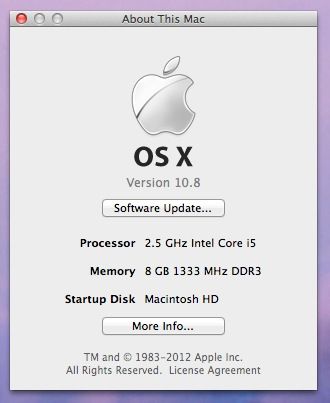
How To Run Almost Any Windows Game On Your Mac Without Boot Camp Or Parallels Using Wine [Feature]First up, you’re gonna need an Intel Mac. If you’re still running a Power-PC Mac, a) it’s time to upgrade and b) this isn’t going to work. To find out what kind of Mac you have, click on the Apple menu in the upper left corner of your screen, choose About This Mac, and it will tell you. Honestly, though, if you don’t know what kind of Mac you’re running, you might have a bit of trouble with the following instructions, which assume you have access to your admin account and password, can install XCode, and have the latest Java Development package (it comes as default with Mac OS X 10.7 and up).

You’ll also need the X11 app, which used to be a standard install app starting in OS X 10.5, but which has recently been removed from OS X 10.8 Mountain Lion. If you’re running 10.8, head over to the XQuartz web page to download an open source version of X11 for Mountain Lion. Install it as you would any other package file.

You’ll also need to be comfortable using the command line via the Terminal app, an internet connection, and a couple of hours to work through all the steps involved. It’s not rocket science, but there is a certain level of patience that will be needed.


Install XCode & MacPorts

How To Run Almost Any Windows Game On Your Mac Without Boot Camp Or Parallels Using Wine [Feature]
If you’re running Mac OS X 10.6 Snow Leopard above, XCode is available in the Mac App Store. If you’re still using OS X 10.5 Leopard (why?), you’ll need to install Xcode from one of the System Install DVDs that came with your Mac. I’m going to assume you’re using either Lion or Mountain Lion for the rest of this article, and just point you to the Mac App Store. Be warned, though: XCode is a 1.6GB  download, so it may take a while depending on your internet connection speed.

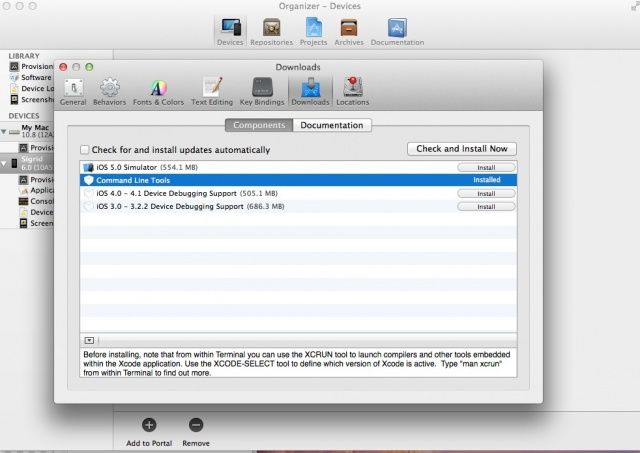
Once XCode is downloaded and installed, launch it and go to the Preferences. Click on the Downloadstab and then install the “Command Line Tools.” If you’re running OS X 10.8 Mountain Lion, copy and paste the following into a Terminal session (Terminal can be found in Applications > Utilities) to avoid some heartache later:

sudo xcodebuild -license

You’ll need to type in your admin password here, as well.

Then quit Terminal, and head to the MacPorts website. Once there, click on the link for your particular version of OS X. I grabbed MacPorts for OS X Mountain Lion, but there are links for Lion and Snow Leopard as well. Launch the package installer and follow the directions, including entering your admin password again. Next, you’ll need to configure MacPorts using the command line, so launch Terminal.

Copy and paste the following into your Terminal window (you’ll need to type in your password again after you hit enter on the keyboard):

echo export PATH=/opt/local/bin:/opt/local/sbin:\$PATH$'\n'export MANPATH=/opt/local/man:\$MANPATH | sudo tee -a /etc/profile

After that process finishes, copy and paste the next line:

if [ `sysctl -n hw.cpu64bit_capable` -eq 1 ] ; then echo "+universal" | sudo tee -a /opt/local/etc/macports/variants.conf; else echo "not 64bit capable"; fi

If your Mac is 64-bit capable, you’ll get +universal as a result. If not, you’ll get not 64 bit capable. Either result is fine; MacPorts is just figuring out what to do for your particular machine. computers should show +universal if you have a 64Bit Mac. If not, it will show “not 64bit capable” which is fine – it’s just showing MacPorts what kind of Mac you have.

Close the Terminal window, and open a new one.


Install Wine

How To Run Almost Any Windows Game On Your Mac Without Boot Camp Or Parallels Using Wine [Feature]
Copy and paste the following text into your newly opened Terminal window:

sudo port install wine

MacPorts will start chugging away, finding all the magic source code that is required to build up a functioning copy of Wine for your specific Macintosh. This will probably take some time, so go get a soda while you wait. Unless it’s later and you’re of drinking age in your local area; in which case, grab a beer or two. This could be a while.


Download and Install Your Game

How To Run Almost Any Windows Game On Your Mac Without Boot Camp Or Parallels Using Wine [Feature]I headed over to the GuildWars website and downloaded the latest .exe file there to install on my Mac. Your game will probably be on another website, or be on CD. Head there, and download the file, making note of the place you save the file.

Head back into Terminal, and type cd /locationOfDownloadedFile, where that last bit is actually the place you put your game file. I put mine in ~/Downloads/, but your download location will be unique to you. If in doubt, you can drag the Finder window where your file is located on top of Terminal to instantly get the correct path.

Once you’re in the proper directory in Terminal, run the installer via your Wine install by typing in the following command:

wine INSTALLER.exe

Of course, the INSTALLER bit will be different for you. For GuildWars, the setup file is called GwSetup.exe. So, I typed in:

cd ~/Downloads/GwSetup.exe
then
wine GwSetup.exe

X11 (you did download XQuartz and install it if you’re running Mountain Lion, right?) then opens up, and you’ll see a standard Windows installer, just like magic. Click on through the installation prompts, and boom, you’re ready to go.


Run, Game, Run

Now, to get your game up and actually running, you’ll need to launch Terminal one final time. Type the following into Terminal to get to your Program Files folder:

cd ~/.wine/drive_c/Program\ Files/

Then type

ls

This should show you the name of the game you installed; head into the folder with a cd command. In that game folder should (finally) be a file that starts the game, ending in .exe – this is your game file. Type the following into Terminal to get it running:

wine PROGRAM.exe

Be sure to replace PROGRAM with your game startup file. You should now be playing that PC game right on your Mac, sans emulation. Whoopee! Let us know what game you got to run this way in the comments. Thumbs up